Bring an old photograph back
Prints do not survive drawers. They crease along the folds, they collect dust and scratches, damp leaves brown blooms across them, and the dye in a colour print from the seventies has usually gone a long way towards magenta by now. respecced repairs the damage and, if you want, puts the colour back, while keeping the photograph the same photograph.
Four different jobs, not one button
Restoring a photograph is really several tasks and they are not always wanted together. "Repair damage" takes out the dust, specks, scratches, creases, tears and stains and leaves the picture as it was otherwise, and if it is black and white it stays black and white. That matters: plenty of people want their grandmother's portrait mended, not colourised.
"Add colour" does the opposite, colourising a monochrome print without touching anything else. "Full restoration" does both. "Revive faded colour" is the one for the seventies and eighties prints that have gone orange or magenta, where there is colour still there and it has simply drifted.
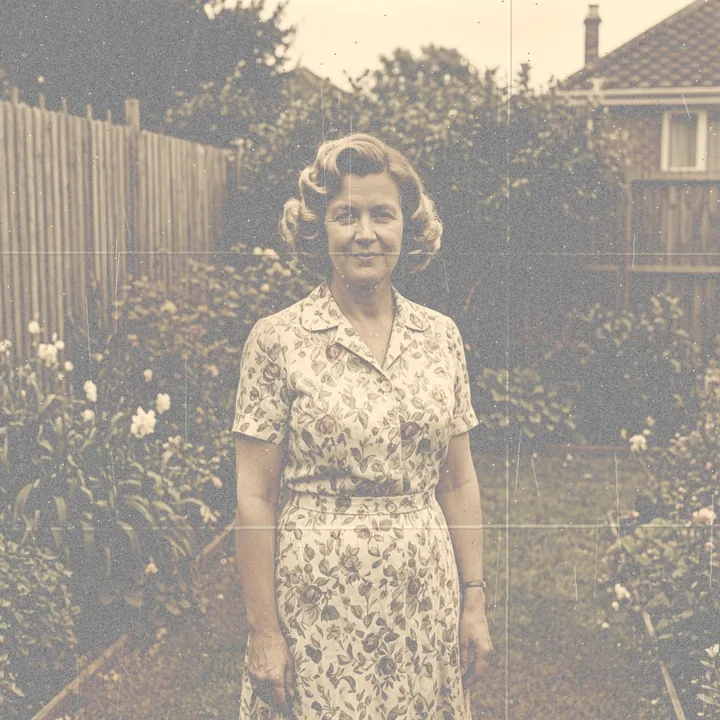
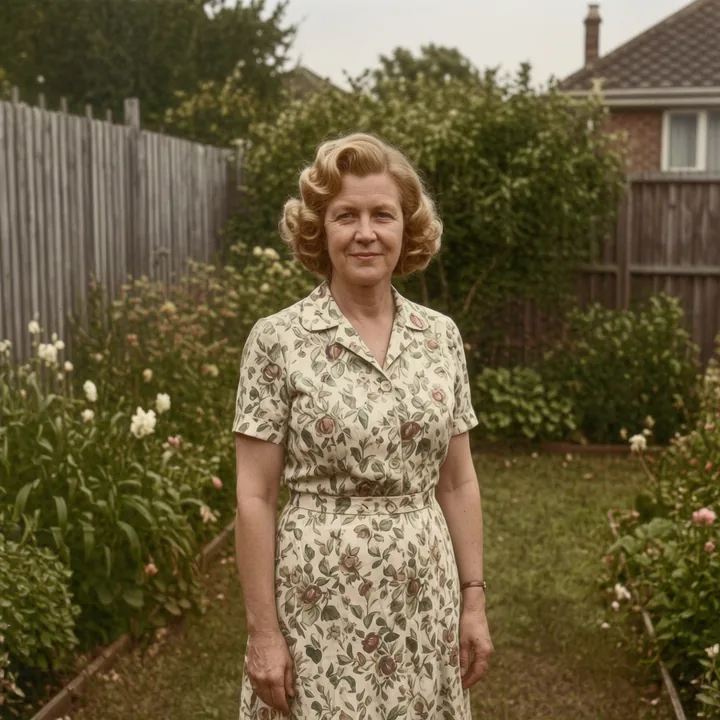
The example above is a full restoration: the creases, dust and damp marks are gone and the dye has been brought back to something like what the print looked like when it was new.
A restoration, not a modernisation
The instructions insist on keeping the era. The clothing stays the clothing of its decade, the hairstyle stays that hairstyle, the setting stays that setting, and the grain and softness of a period photograph are not polished into something that looks like it was taken last week on a phone.
That is a deliberate line. A "restored" photograph where your grandmother has modern hair and modern light is not a restoration of anything; it is a new picture of somebody who resembles her. What you want back is the photograph, improved, and that is what these presets are tuned to give you.
Two limits worth knowing before you upload
The first is that respecced works on one person at a time, and a photograph with two or more people in it is refused. That rules out a lot of family photographs, which are very often groups, and there is no way round it at the moment: every prompt says "this exact same person" and with two people in frame which one gets changed is a coin toss.
The second is harder. Every uploaded photograph is screened, and anyone who may be under eighteen is refused. A childhood photograph of a parent or a grandparent will therefore be turned away, which is a common and entirely reasonable thing to want restored. That is the safety rule working exactly as specified rather than a fault, and it will not be weakened, but you should know about it before you go looking for the scan.
So the photographs this works on are single adults. A portrait, a wedding photograph of one person, somebody standing in a garden.
Getting a good scan
A flatbed scan at 600 dpi is ideal. If you are photographing a print with a phone instead, lay it flat, use daylight from a window rather than a ceiling light, and take the picture straight on rather than at an angle, so the print is a rectangle and not a trapezium.
Do not try to clean the print itself first. Rubbing a photograph almost always makes it worse, and the damage is what the repair preset is for.
How it works
A selfie is enough. Face on, decent light, everyday clothes. Software screens it before anything happens; no person sees it.
Pick from presets. There is nothing to type and nothing to learn.
Slide between before and after, keep what you like, stack another change, download.
Options you can tap
Questions
Will it keep the photo black and white?
Yes, if you use "Repair damage". It takes out the damage and leaves a monochrome print monochrome. Use "Add colour" or "Full restoration" only if you want it colourised.
Can I restore a group photo?
No. respecced works on one person per photograph and refuses pictures with more than one person in them.
Can I restore a photo of a child?
No. Every upload is screened and anyone who may be under eighteen is refused. That rule is not relaxed for old photographs.
Will it modernise the picture?
No. The clothing, hair and setting of the period are kept deliberately. It is a repair, not a restyling.
Is it free?
Yes, to start with. You get a few free respecs on your first visit with no account and no card; after that you buy credits or subscribe.
Want to try it on yourself?
Upload one photo and see it in about twelve seconds. A few free respecs to start, no account and no card. Adults only; your photos stay private, every image is checked, and photos and results are deleted after 24 hours.
Try it free